API overview
The EyalSec API lets a script do what you do in the dashboard: read your events, machines and activity, and change your machines, rules and settings. This page covers how to sign your requests, the limits, the errors, and where each group of endpoints is documented.
What the API is
The API is a set of HTTP endpoints that answer in JSON. It is the same backend the dashboard itself talks to, so anything you can see or change on a dashboard page you can also read or change from a script.
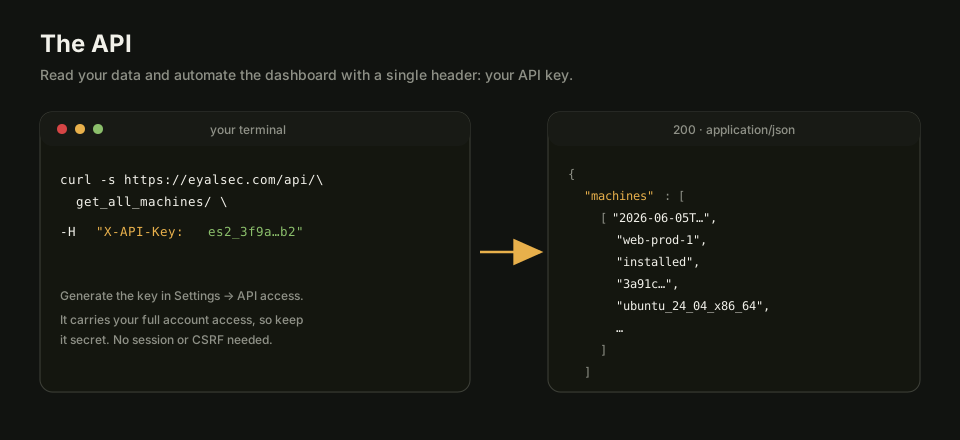
All paths are relative to your EyalSec address. For the hosted service that is https://eyalsec.com, so GET /api/get_all_machines/ means https://eyalsec.com/api/get_all_machines/. If your account lives on another domain, use that one instead.
The dashboard also has a built-in reference: open API in the sidebar (the page at /scanner/api). It lists every endpoint your account can call, each marked read only or writes, with the same examples as these pages.
Authentication
Every /api/ endpoint needs to know who you are, except the two public lists GET /api/supported_os_types/ and GET /api/supported_python_versions/. A script proves it with an API key; a page already open in your browser can use your signed-in session instead.
API key
An API key is a secret token you send in the X-API-Key header of every request. It is the recommended way to call the API from a script, a CI job or a terminal.
X-API-Key: es2_EXAMPLEKEYdoNotUse0000000000000000000000
Create the key on the Settings > API access page (see API keys). It starts with es2_ and is shown only once, when you generate it, so copy it then. Your account has one key at a time: generating a new one replaces the old one.
Requests signed with a key need no CSRF token and never get an HTML page or a redirect to the sign-in screen. A missing, wrong, revoked or expired key is answered with 401 and {"error":"invalid or expired API key"}.
Read-only keys
A read-only key can call every endpoint marked read only and is refused every endpoint marked writes, with 403 and {"error":"this API key is read-only"}. You choose this when you generate the key.
The decision is made per endpoint, not by HTTP method. The events query, POST /api/get_all_events_with_count/, is a POST because its filters travel in the body, but it is a read, so a read-only key may use it. Under /api/account/ every GET is a read and every POST is a write.
Session and CSRF
If you are signed in to the dashboard in a browser, requests from that browser are authenticated by your session cookie, the way the dashboard's own pages call the API. Every request that changes something must then also carry your CSRF token.
Send the token either as an X-CSRFToken header or as a csrf_token form field. The dashboard puts the token in a cookie that page scripts can read, named __Host-csrftoken on eyalsec.com. This route suits a snippet run in your browser's console; for anything standalone, use an API key.
When writes are refused
Some accounts are temporarily limited to reading: for example, when the account's plan has ended. On such an account every request that changes something answers 403 with a message saying why, while reads keep working. Contact sales@eyalsec.com to restore it.
An account that has not been given a plan yet can sign in and read, but its machine limit is 0, so adding a machine answers 409 (see Plans and limits).
A worked example
This fetches your event statistics with nothing but the key. Replace the key with your own.
curl -s https://eyalsec.com/api/get_event_stats/ \
  -H "X-API-Key: es2_EXAMPLEKEYdoNotUse0000000000000000000000"
A typical answer:
{
  "total_hits": 1234,
  "unique_types": 12,
  "last_1h": 3,
  "last_24h": 40,
  "last_7d": 300,
  "top_events": [{"where": "socket-recv", "count": 900}],
  "recent": [{"time": "2026-07-05T12:00:00Z", "where": "socket-recv", "count": 3}],
  "timeline_14d": [{"date": "2026-07-05", "count": 40}],
  "first_detection": "2026-06-01T00:00:00Z",
  "latest_detection": "2026-07-05T12:00:00Z"
}
Add the same -H "X-API-Key: ..." header to every request on the other API pages. Endpoints that take a JSON body also need -H "Content-Type: application/json"; the ones that take form fields accept curl's -d name=value as is.
Rate limits
The API limits how many requests you can make per minute so that one busy script cannot slow the service for everyone. A request over a limit is answered with 429 and a Retry-After header giving the number of seconds to wait.
| Limit | Applies to |
|---|---|
| 300 requests per minute per account | Every request signed with an API key. It is counted against your account, so generating a new key does not reset it. Short bursts of up to 60 are absorbed. |
| 600 requests per minute per IP address | All traffic from one address, with or without a key. |
| 120 requests per minute per IP address | The events calls together: the events query, the export, the map, one event's detail, the runs list, and the two count endpoints /api/event_view_counts/ and /api/event_visibility_counts/. |
| 10 per minute per account | Calls under /api/account/ that ask for your password. |
The per-account and per-address limits are counted separately and both apply, so whichever runs out first is the one you hit. The per-key and password limits answer with a JSON body; the per-address limits answer in plain text.
Wrong passwords lock the account
Getting your password wrong five times in a row locks the account for one minute, and each further failure doubles the wait, up to 15 minutes. It is the same counter the sign-in page uses, so a lock applies everywhere; while it lasts, even the right password gets 429. See Signing in.
Errors
The API uses standard HTTP status codes, so check the status first. The body carries a short message: some endpoints send it as JSON ({"error": "..."}), others as plain text, and a key request never gets an HTML page.
| Status | Meaning |
|---|---|
| 400 | Bad request: malformed JSON, an invalid regex, an unreadable cursor or date, or an unknown value such as a view that does not exist. |
| 401 | The API key is missing, wrong, revoked or expired. |
| 403 | Not allowed: a failed CSRF check, a read-only key trying to write, a product or feature that is not enabled on your account, a wrong password on an /api/account/ call, or a write on an account limited to reading. |
| 404 | Not found. Also returned for things that belong to another account, so their existence is never confirmed. |
| 409 | Conflict with the current state: the machine limit is reached, a label name is taken, or a two-factor step is out of order. |
| 422 | A field is missing or invalid: an unknown OS target or Python version, a name that is too long, a missing install confirmation. |
| 429 | A rate limit was hit, or the account is locked after wrong passwords. |
| 500 | Something failed on our side. The body does not describe it; try again, and contact support if it persists. |
The API pages
Each group of endpoints has its own page. Every endpoint there has a short description, its parameters, an example request and an example answer.
- Events: query, export and map events, one event's detail, runs, counts and saved searches.
- Machines: list, add, rename and delete machines, install and uninstall commands, supported targets.
- Filters, rules and taint: filters, machine rules, taint sources and the unique-event definition.
- Rule templates: list, create, apply and snapshot rule templates.
- Labels and notes: your triage labels and your note on each event.
- Activity and account: your activity log, profile, password, two-factor settings and API key.
- Agent endpoints: what the installed agents call, for reference.