How EyalSec works
This page explains the four ideas behind every EyalSec product: untrusted data, sources, sinks and events. It also covers the two things EyalSec can do when it finds one, report it or block it.
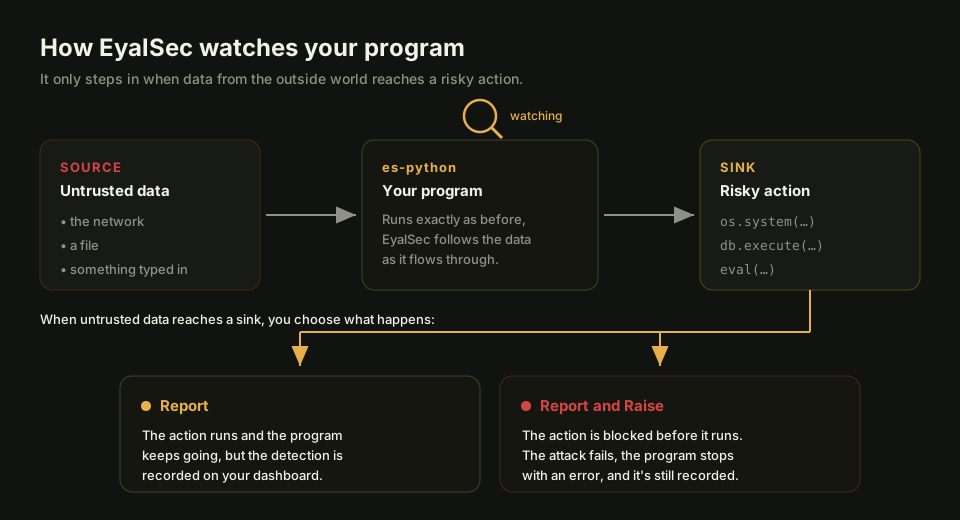
Untrusted data (taint)
Untrusted data is any data your program got from the outside world, where someone else could have chosen what it says. EyalSec also calls it tainted data, or taint. A request body, a file an attacker could have written, and an environment variable are all examples.
EyalSec marks that data when it enters your program and keeps following it as the program copies it, joins it with other text, slices it or passes it to other functions. If a piece of untrusted data ends up inside a shell command, the command is tainted too, even though no single line of your code looks wrong.
Most real attacks work this way: data an attacker controls travels through code that trusts it, and ends up being run, opened or queried.
Sources
A source is a place where untrusted data enters your program. Each source is a separate switch, and all of them start off, so you decide what EyalSec treats as untrusted.
For es-python the sources include:
- Network sockets: data your program receives over the network.
- Files: data read from files.
- Standard input: text typed in or piped to your program.
- Environment variables and command-line arguments.
- Foreign code: Python code on disk that another user could have changed.
es-chromium has its own set. What each source watches, and how to switch it on, is on Taint sources. You switch sources on in the Configure window.
Sinks
A sink is a risky action where untrusted data can do harm. Running a system command, evaluating code, opening a file path, sending a database query, loading a module and fetching a URL are all sinks.
A sink is not a bug on its own: programs run commands and open files all the time. It becomes a finding when the value reaching the sink contains untrusted data. The example below is safe with a fixed command and dangerous when part of the command came from a request:
import os
name = request.args["name"]      # untrusted: it came from the network
os.system("convert " + name)     # sink: runs a shell command
Events
An event is what EyalSec records when untrusted data reaches a sink. It says which sink was reached, where in your code, what the value looked like, and where the untrusted part came from.
When the same thing happens again, EyalSec does not add a new row. It raises the count on the existing event, so a busy program gives you a short list of distinct problems rather than thousands of copies. What counts as "the same" is up to you; see Unique event.
Events appear on the Events page, one list per product, each with a severity so you can see what to look at first. Opening one shows the full detail; see Event detail.
Report, or report and raise
When untrusted data reaches a sink, EyalSec can either record it and let the program carry on, or record it and stop the action before it runs. You choose, per machine and per kind of event.
- Report records the event on your dashboard. Your program keeps running exactly as it would without EyalSec. This is what happens by default once a source is on.
- Report and Raise records the event and blocks the action: the program gets an error at that line instead of running the command or query. An attack fails instead of only being logged.
Report and Raise has to be enabled on your account first. See Report and Raise for how it works and how to switch it on, and Plans for getting it enabled.
Putting it together
A typical setup follows the same path as the picture at the top of this page.
- You install a product on a machine and run your program through it.
- You switch on the sources you care about, for example the network.
- A request arrives and its data flows through your code into a shell command.
- EyalSec sees untrusted data at the sink and sends an event to your dashboard (and blocks the command, if you chose Report and Raise).
- You open the event, see where the data came from and which line used it, and fix the code or add a rule if the flow is expected.
The Quick start walks through these steps on a real machine.