What is EyalSec?
EyalSec watches your programs while they run and tells you when data from the outside world reaches a risky action. This page explains the idea, the three pieces you work with, and the products you can use.
The short version
EyalSec runs inside your program and follows untrusted data (data that came from outside, such as a network request or a file) as the program uses it. When that data reaches a risky action, such as running a system command, opening a file or sending a database query, EyalSec records it on your dashboard and, if you ask it to, blocks the action.
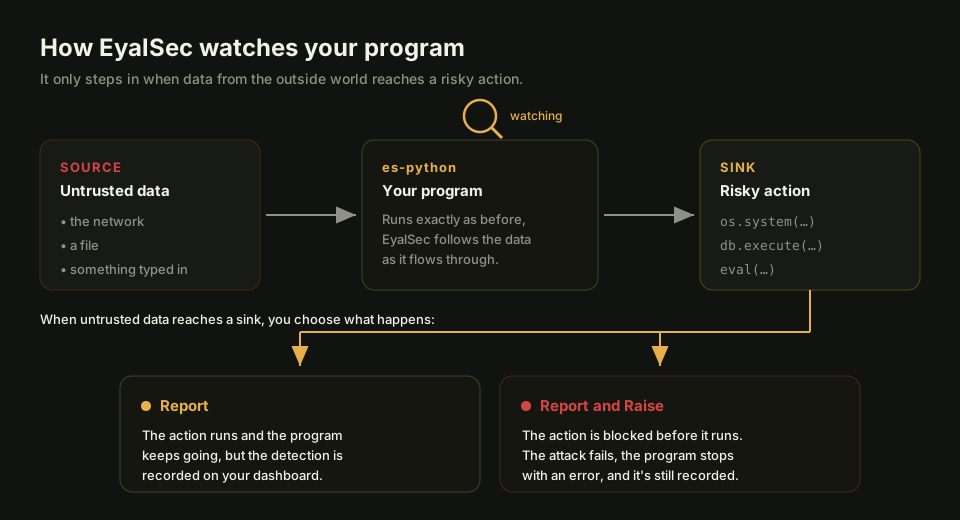
Nothing in your code has to change. For es-python, the product most accounts start with, you run your program with es-python instead of python and it behaves exactly as before.
Two things make a finding worth your time:
- It sees the real operation. EyalSec looks at the command, query or file path your program actually uses, at the moment it uses it, not at a copy of the traffic on the way in. There is nothing in between for an attacker to encode around.
- It is evidence, not a guess. Every event is a flow that really happened on real input, with the path from where the data came in to where it was used.
The ideas behind this (untrusted data, sources, sinks and events) are explained in plain words in How EyalSec works.
The three pieces
You work with EyalSec through three parts that fit together: the agents on your machines, the web dashboard, and the API.
Agents
An agent is the EyalSec product that runs your code and watches it. es-python, for example, is the EyalSec Python runtime: you install it on each machine where your Python code runs, and it sends what it finds to your dashboard. Each product has its own agent.
The dashboard
The dashboard is the website where you sign in, add machines, watch events arrive, cut noise with filters and change how each machine behaves. Start with the Quick start, or read about the Dashboard page.
The API
The API is a JSON interface that does what the dashboard does, so you can automate EyalSec or pull events into your own tools. You call it with an API key. See the API overview.
Products at a glance
EyalSec comes as two products. es-python watches Python programs; es-chromium is the EyalSec browser, which watches web pages.
Which products you can use is set per account. es-python is on by default, and es-chromium is enabled when your plan includes it. Your events page shows one list per product you have. Both products, and how they are enabled, are described on Products.
Where to go next
If you are new, these pages take you from nothing to your first event.
- How EyalSec works: the four ideas you need.
- Quick start: create an account, add a machine, see an event.
- Glossary: every term in one place.
If you get stuck, see Troubleshooting or Getting help.