Report and Raise
EyalSec can respond to a detection in two ways: Report records it and lets the program carry on, while Report and Raise also blocks the risky operation. This page explains both, how to turn blocking on, and what your program sees when an operation is blocked.
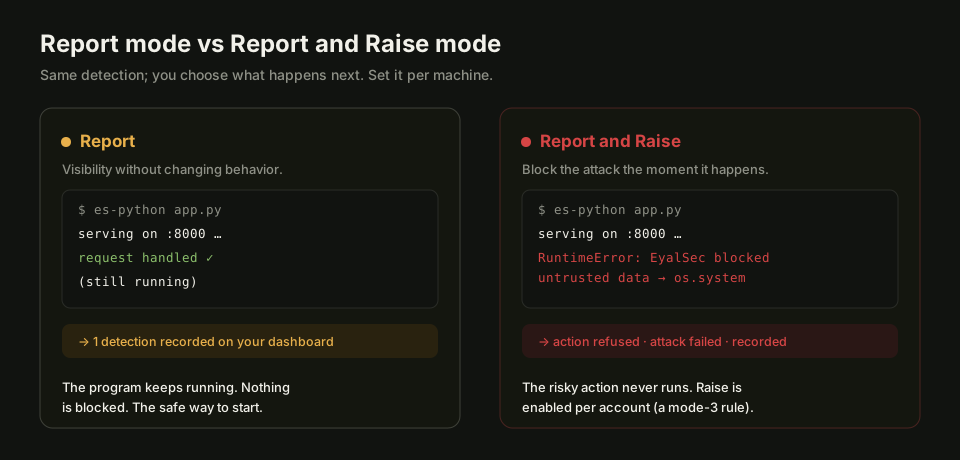
Report: record and carry on
In Report mode EyalSec records what it saw on your dashboard and lets your program keep running exactly as it would without EyalSec. It is the default: every machine reports, and nothing is blocked until you add a Raise rule.
Each report is an event with the data involved, where it came from and the line of code that used it. Report is the right place to start, because it can never break a working program. Use it to:
- see what a new or unfamiliar application does with untrusted data;
- collect evidence before deciding to block anything;
- watch production without changing its behaviour.
Report and Raise: record and block
In Report and Raise mode EyalSec stops the risky operation instead of letting it run. On es-python the program gets a RuntimeError at that point, and the event is still recorded, so you see what was blocked. You turn it on with a Raise rule that says which operations to block.
For example, a program that runs a shell command built from untrusted data:
import os
user_input = get_data_from_the_internet()   # untrusted data
os.system(user_input)                        # risky operation
Under Report this runs and is recorded. Under a Raise rule that matches os system, the command does not run and the program gets:
RuntimeError: EyalSec: untrusted data from socket:203.0.113.7:443 reached sink os system
The message names where the data came from and which operation it reached. The error behaves like any other Python exception: if your code catches errors around that operation, it can recover; if not, the program stops there, which is usually what you want while an attack is in progress.
At almost every operation the error is raised before the operation runs. At a small number of operations that cannot be interrupted part-way, it is raised immediately after.
Turning on Report and Raise
Add a rule with the mode Raise (machine) in the Configure window for one machine, or on the Filters page for every machine. The rule's pattern and source decide which operations are blocked; everything else is still only reported.
- Open Configure on the machine's row on the Machines page (or open Filters).
- In the empty row at the bottom of Rules, enter a pattern such as
^os system$in Event (regex). - Choose Raise (machine) in Mode and press +.
The machine picks up the new rule within about 30 seconds and applies it from the next event, without a restart (see When a change reaches the machine).
Start narrow. A Raise rule with an empty pattern blocks every operation that reaches untrusted data, including ones that happen while the program is still starting, so the program may stop before your own code runs. Watch a machine in Report mode first, then raise on the operations you understand.
Who can use it
Raise must be enabled for your account. If it is not, Raise (machine) does not appear in the Mode list, and a Raise rule added through the API or a template is refused or skipped with "Raise rules are not enabled for your account. Ask an administrator to enable them." Reporting works on every account. See the Raise gate.
It also depends on the product:
- es-python acts on Raise rules and stops the operation.
- es-chromium does not offer Raise.
The --raise flag
es-python also accepts --raise (or --raise-on-found, or ES2_RAISE=1) on the command line, which blocks every detection in that run. It is an older switch, and it only works while the machine has no Raise rules at all, global or its own. Once any Raise rule applies to the machine, the rules decide and the flag is ignored.
es-python --make-socket-vuln --raise app.py
The flag has an effect only when at least one taint source is on. For anything beyond a quick local test, use Raise rules: they are visible on the dashboard, they can be narrowed to the operations you mean, and they change without restarting the program.