The life of an attack
This page follows one attack from start to finish. Meet Mallory, who is not a customer, and a small photo app with a line of code that trusts its input a little too much.
@app.route("/resize")
def resize():
    os.system("convert " + request.args["name"])
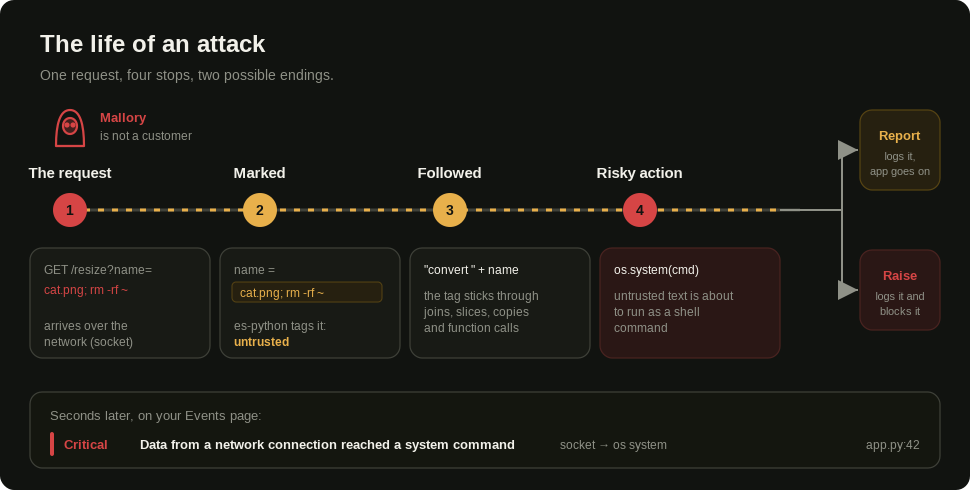
Four stops
- The request. Mallory asks for a file called
cat.png; rm -rf ~. It arrives over the network. - Marked. es-python tags that text as untrusted the moment your app reads it.
- Followed. The tag stays on as your code glues the text into a command.
- Risky action.
os.systemis about to run text that came from a stranger. This is the moment EyalSec acts.
The event lands on your Events page within seconds, graded Critical, with the exact line of your code.
Two endings
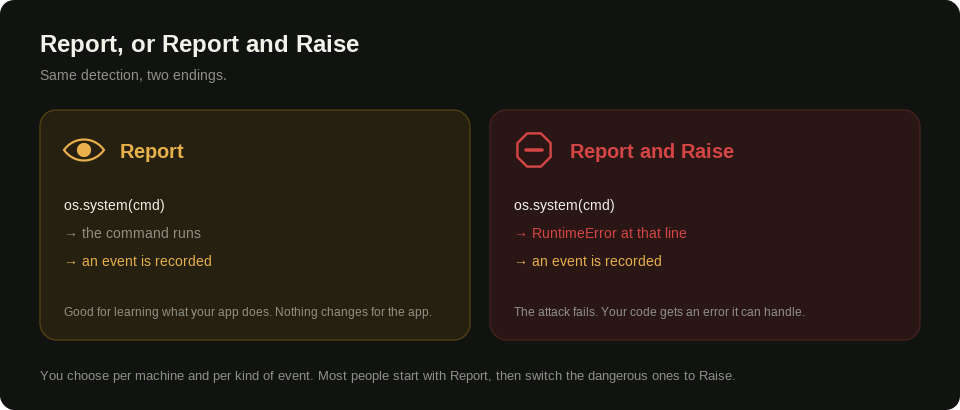
With Report, you learn about it. With Report and Raise, Mallory's command never runs: your code gets an error at that line instead. You pick per machine and per kind of event; see Report and Raise.
Next: What es-python watches.
 EyalSec